AI TOOL / #07442
Ripper Web Content | Capture Metadata Content
A tool designed to analyze images and documents on websites, extract data from them, and enable further operations.
Introduction
A tool for analyzing images and documents on websites, extracting data and enabling operations.
What is the Ripper Web Content AI Chrome extension/plug-in?
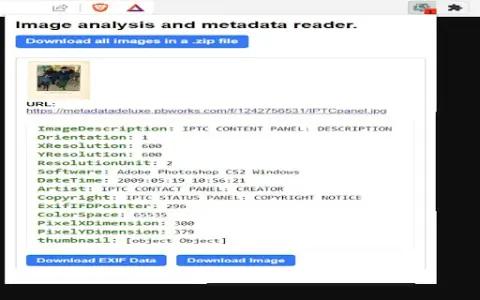
Ripper Web Content is a multi-functional tool that can analyze images and documents on websites, extract detailed information from them, and facilitate various operations on these files. This extension is of great value in digital forensics and investigative contexts. Moreover, due to its reverse search and facial analysis capabilities, it is also widely utilized in the field of open-source intelligence (OSINT).
How to use the Ripper Web Content AI Chrome extension/plug-in?
Use Ripper Web Content to analyze images and documents on websites. It enables you to extract metadata, perform reverse image searches, use FotoForensics to analyze images, detect faces, quickly download images, and scan documents in order to extract and download metadata.
The core functionality of the Ripper Web Content AI Chrome extension/plug-in
Image metadata extraction and download
Reverse image search (Google Lens, TinEye)
PhotoForensics analysis
Face detection (age, gender, emotion)
Document scanning and metadata extraction
Related
Compression of tiny PNG images
Tiny PNG is an intelligent online tool for compressing WEBP, PNG, and JPEG images. It utilizes advanced lossy compression techniques to reduce the size of these file formats. By selectively reducing the number of colors in an image, it minimizes the amount of data needed for storage.
PDF Online Toolkit
A free and easy-to-use online PDF tool that offers a total of 24 features for editing PDF files directly online.
Ma Xiaobang's Blog
Ma Xiaobang’s Blog is a personal website dedicated to sharing internet-related experiences. The blogger uses easy-to-understand articles to introduce a wide range of high-quality software and online tutorials to everyone. (Ma Xiaobang: Of course, I should give myself some praise!) Scan the QR code to follow its WeChat official account.
New BaseTab AI
AI-powered new tab workspace for browsers
The new GPT Image Hub
A database containing over 30,000 AI-generated image prompt templates
New Enclave
The notch on the Mac has evolved into an AI-based status panel.