AI TOOL / #07222
ReadImage
Extract, edit, and copy text from images on web pages.
Introduction
Extracts, edits, and copies text from images on web pages.
What is Image Text Extractor ai chrome extension/plugin?
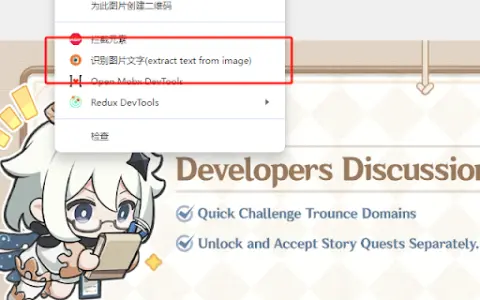
This extension allows users to extract text from images displayed on web pages. It supports common image formats such as jpg, jpeg, png and bmp. After extraction, the text can be edited and copied.
How to use Image Text Extractor ai chrome extension/plugin?
Hover your mouse over the image, right-click and select "Extract text from image". Press "Ctrl + Q" to view the extracted text on the extension page, where it can be edited and copied.
Image Text Extractor ai chrome extension/plugin core features
Extract text from images on web pages
Edit extracted text
Copy extracted text
Related
ScribeMD – AI Medical Scribe
A healthcare-focused AI platform that streamlines workflows and reduces doctors’ administrative workload.
Healthjump Beacon
Real-time integration of patient data into EMR systems enhances the quality of medical services.
MedUp
An AI-driven medical encyclopedia that provides reliable health information and treatment options.
CoughPro
Cough Assistant is an app that uses artificial intelligence to track and analyze coughing in real-time.
clearstep.health
An AI medical assistant designed for patient access, nursing navigation, and operational support solutions.
LuxAura AI
An AI-based platform for recommending personalized skincare routines.