AI TOOL / #06716
VoiceWave: ChatGPT Voice Control
Enhance ChatGPT's voice control, read-aloud functionality, and multilingual support.
Introduction
Enhances ChatGPT with voice control, read-aloud features, and multi-language support.
What is the ChatGPT Voice Control Extension AI Chrome extension/plugin?
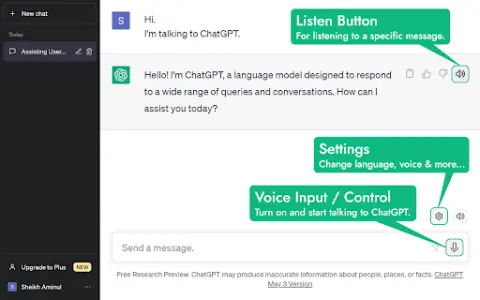
This extension enhances ChatGPT's voice control and read-aloud capabilities by leveraging advanced speech recognition and text-to-speech (TTS) technology. It allows users to have voice conversations with ChatGPT in multiple languages, enabling them to interact with the AI without typing. Users can easily send voice queries and listen to the AI's responses.
How do I use the ChatGPT Voice Control Extension AI Chrome extension/plugin?
Install the extension, enable the microphone, and start speaking. Access settings via the ️ icon to customize voice control language, speech rate, voice commands, and keyboard shortcuts. Click the ️ icon or press the spacebar to activate voice control. Click the icon to listen to messages or toggle read-aloud.
Core features of the ChatGPT Voice Control Extension AI Chrome extension/plugin
Multilingual voice control and input
Text-to-speech functionality for AI responses
Customizable voice and language settings
Adjustable speech rate
Customizable message sending options
Automatic language detection for TTS
Read-aloud feature with sentence highlighting
Customizable keyboard shortcuts
Real-time voice conversation
Related
Quick Search for Insect Tribe
Insect Tribe is a search-themed website that provides quick access to dozens of popular search engines. By integrating these engines onto a single page, it enables users to switch between them more quickly and conduct searches in a more efficient and accurate manner.
Snapdrop
Snapdrop is an open source online file transfer tool that can be used on any platform such as Windows, Mac, Linux, iOS, and Android. As long as your device has a browser, you can use it to transfer files.
New Godwit
Open-source AI-based native email client
New Command Code
Programming Agent specially polished for open source models
New AI Web Maker
Describing your business is essentially the same as creating a corporate website.
New RFPG
UK Property Scanning and Renovation Appraisal