AI TOOL / #06171
Patsa – AI-powered Meeting Copilot
A Chrome extension that enables real-time transcription and AI-powered Q&A during online meetings.
Introduction
Chrome extension for real-time transcription and AI-powered Q&A during online meetings.
What is the Patsa AI Chrome extension/plugin?
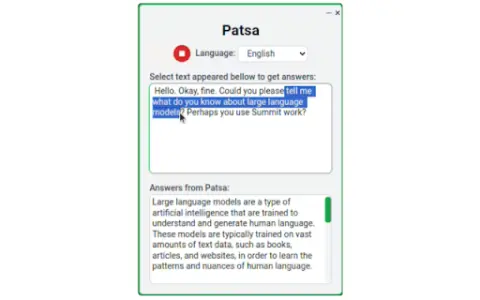
Patsa is a Chrome browser extension designed to enhance online meetings on platforms such as Google Meet, Zoom, and Teams. It transcribes other participants’ speech in real time and lets users select transcribed text to ask AI questions, providing instant information and answers.
How do I use the Patsa AI Chrome extension/plugin?
1) Launch the Patsa extension in any online meeting in Chrome. 2) Click the "Start Transcribing" button to transcribe what the other participants are saying. 3) Select the transcript text you want to ask the AI about, and you'll receive an instant response from the AI.
Core features of the Patsa AI Chrome extension/plugin
Real-time transcription of participants’ speech
AI Q&A based on transcribed text
Related
FUTDroid
FUTDroid is a rush bot for EAFC24 used to generate coins and build dream teams.
TradeSage – TradingView Enhancement Suite
Trading assistant with AI-driven Pine Script generation and strategy optimization.
Flow Trade
A trading platform that provides tools and a community for retail investors, with a focus on data analysis.
Univw.AI
A sales CRM solution designed for startups and small businesses, aimed at managing potential customers and accelerating growth.
Arold
An AI-powered Android app designed to improve the Airbnb hosting experience.
DocuPull
An artificial intelligence-based platform designed to automatically complete loan application forms and generate property ownership reports.